OAuth (Client Credentials)
Machine-to-machine authentication using OAuth 2.0 client credentials.
For automated systems, CI/CD pipelines, and service-to-service integrations, Provenance supports the OAuth 2.0 Client Credentials grant. This gives you short-lived access tokens with fine-grained scope control — ideal when you don't want to share a long-lived API key.
How it works
- Create an OAuth App from the platform dashboard.
- Use the
client_idandclient_secretto request an access token. - Use the access token in the
Authorization: Bearerheader. - Tokens expire after 1 hour — request a new one when needed.
Creating an OAuth app
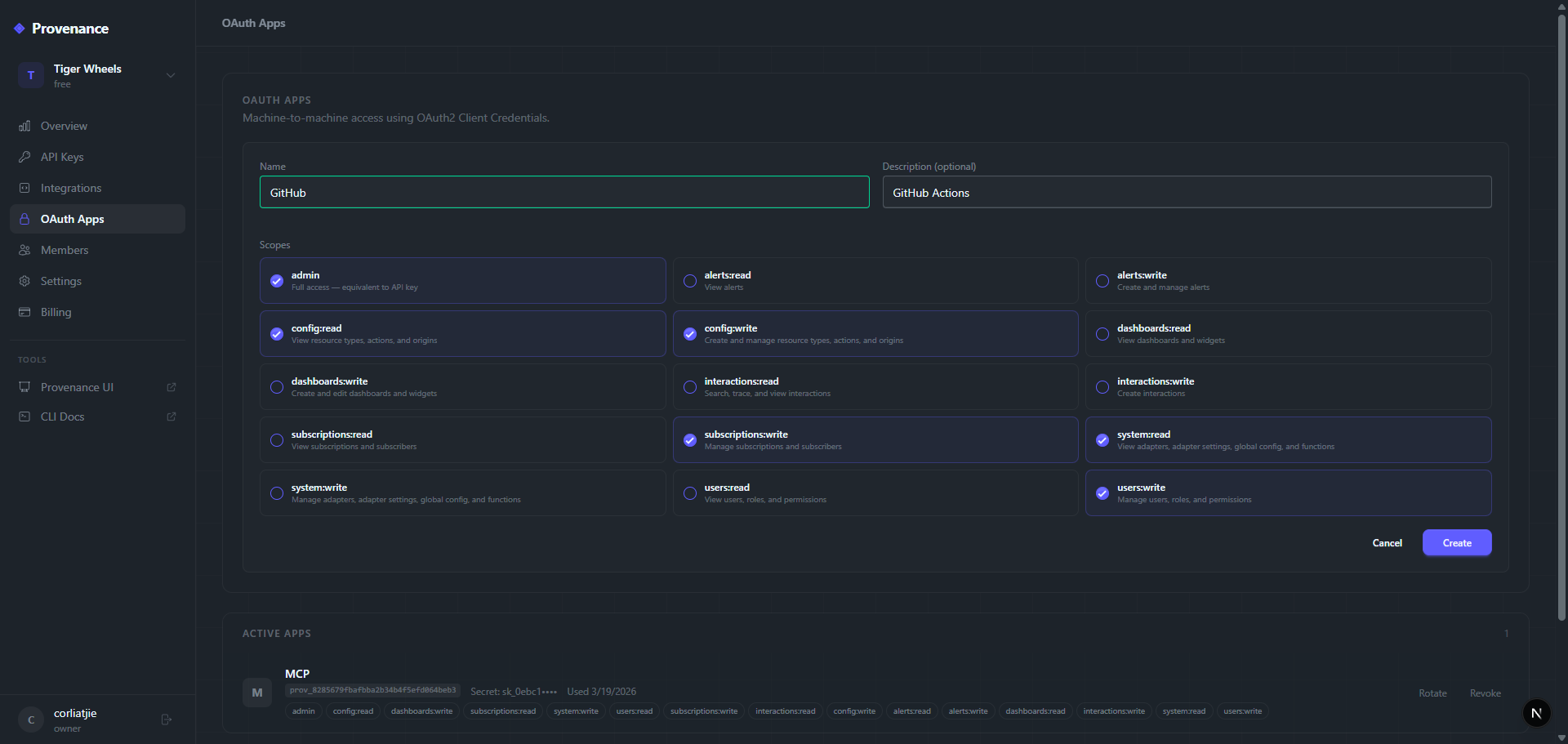
Navigate to OAuth Apps in the platform dashboard.
- Click Create OAuth App.
- Enter a name and optional description.
- Select the scopes your app needs (see Scopes below).
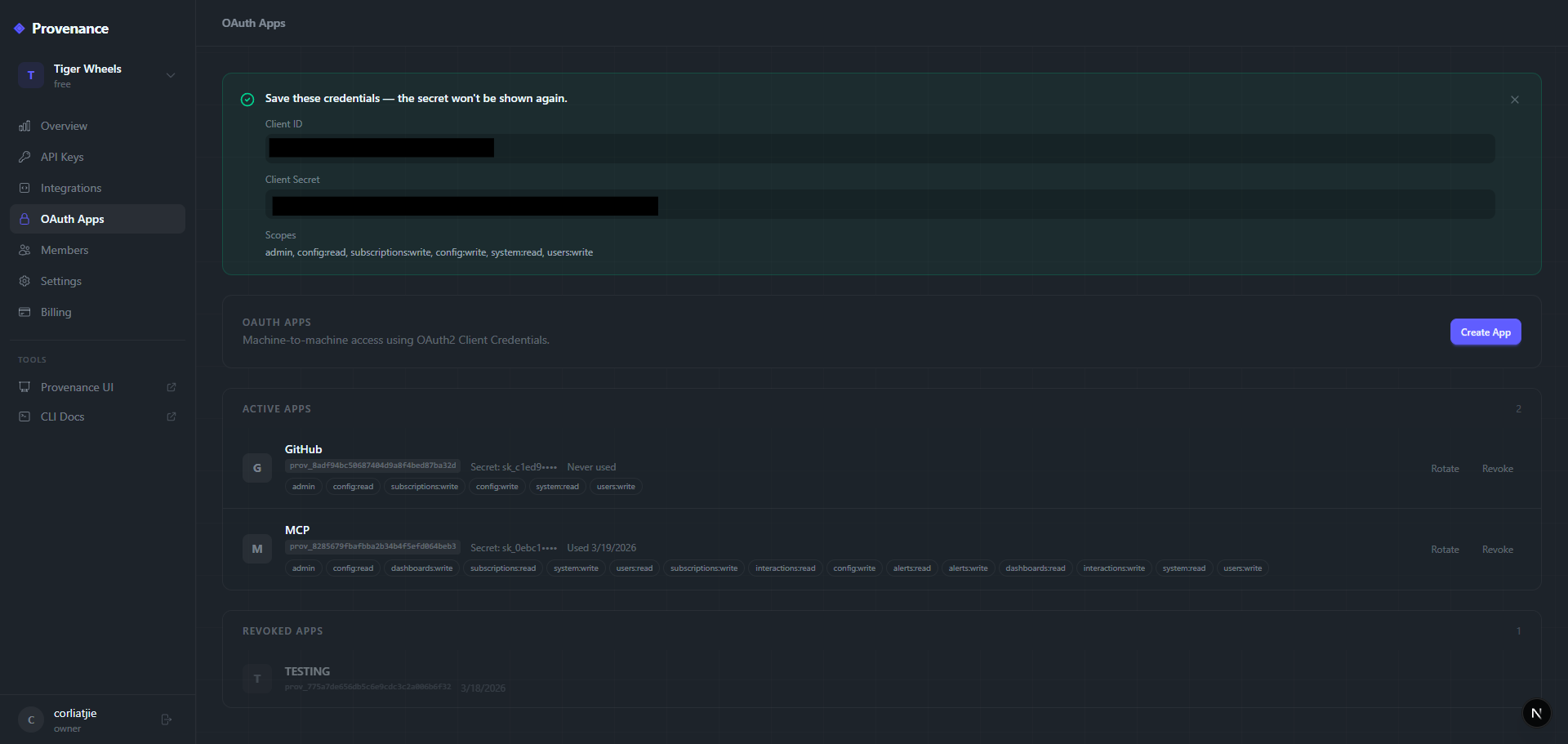
- Copy the
client_idandclient_secret— the secret is only shown once.
Once created, you'll see the client_id and client_secret. Copy the secret immediately — it's only shown once.
Requesting a token
curl -X POST https://provenance-web.onrender.com/oauth/token \Response:
{
  "access_token": "oat_...",
  "token_type": "Bearer",
  "expires_in": 3600,
  "scope": "interactions:write interactions:read"
}
Using the token
Pass the token in the Authorization header:
curl https://provenance.onrender.com/api/interactions \The token is validated against your tenant's schema — it automatically resolves to the correct tenant without needing x-api-key.
Scopes
Scopes control what the token can access. Select only the scopes your integration needs.
| Scope | Description |
|---|---|
interactions:read | Read interactions, traces, activity search |
interactions:write | Create new interactions |
dashboards:read | View dashboards, widgets, and analytics queries |
dashboards:write | Create and manage dashboards and widgets |
alerts:read | View alerts, metrics, and audit logs |
alerts:write | Create and manage alerts |
subscriptions:read | View subscribers, subscriptions, and queue |
subscriptions:write | Manage subscribers and subscriptions |
config:read | View resource types, actions, and origins |
config:write | Create and manage resource types, actions, and origins |
system:read | View adapters, adapter settings, global config, and functions |
system:write | Manage adapters, adapter settings, global config, and functions |
secrets:read | View secrets and secret providers |
secrets:write | Manage secrets and secret providers |
inbound:read | View inbound sources and mappings |
inbound:write | Manage inbound sources and mappings |
users:read | View users, roles, and permissions |
users:write | Manage users, roles, and permissions |
admin | Full access — equivalent to API key |
Managing OAuth apps
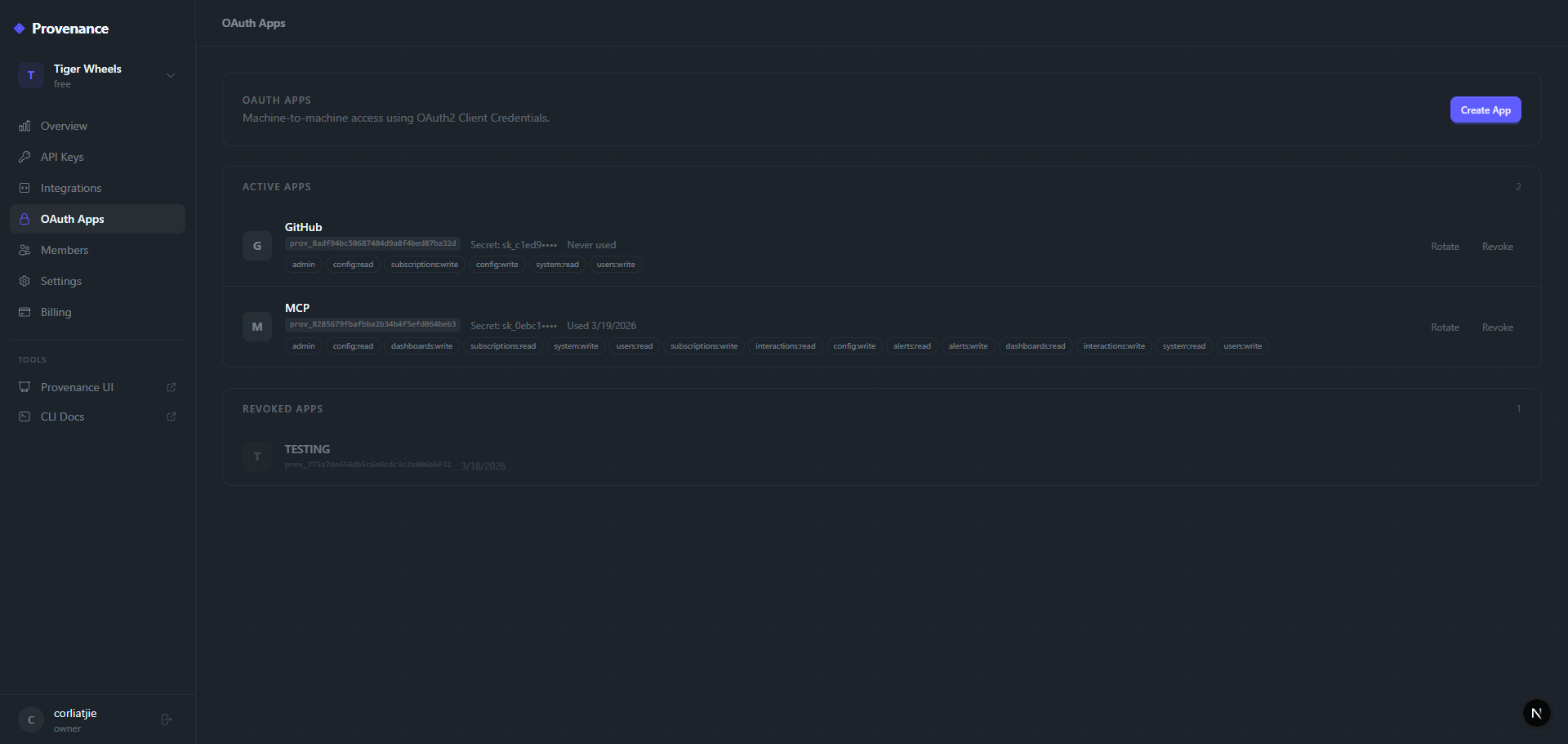
From the OAuth Apps page you can:
- View all apps — see client ID prefix, scopes, last used date, and status.
- Edit — update name, description, or scopes.
- Rotate secret — generate a new client secret (invalidates the old one).
- Revoke — permanently deactivate the app and all its tokens.
Token lifecycle
- Tokens expire after 1 hour (3600 seconds).
- There is no refresh token — request a new access token when the current one expires.
- Revoking an OAuth app immediately invalidates all tokens issued by that app.
- Rotating the client secret does not invalidate existing tokens (they expire naturally).
OAuth vs API keys
| API Key | OAuth Token | |
|---|---|---|
| Lifetime | Until revoked | 1 hour |
| Scope | Full access | Fine-grained scopes |
| Best for | Simple integrations, CLI, SDK | CI/CD, service-to-service, least-privilege |
| Header | x-api-key | Authorization: Bearer |
| Rotation | Manual from dashboard | Automatic (request new token) |
Example: GitHub Actions with OAuth
jobs:
  deploy:
    runs-on: ubuntu-latest
    steps:
      - name: Get Provenance token
        id: token
        run: |
          RESPONSE=$(curl -s -X POST https://provenance-web.onrender.com/oauth/token \
            -H "Content-Type: application/json" \
            -d '{
              "grant_type": "client_credentials",
              "client_id": "${{ secrets.PROV_CLIENT_ID }}",
              "client_secret": "${{ secrets.PROV_CLIENT_SECRET }}"
            }')
          echo "token=$(echo $RESPONSE | jq -r .access_token)" >> $GITHUB_OUTPUT

      - name: Record deployment
        run: |
          curl -X POST https://provenance.onrender.com/api/interactions \
            -H "Authorization: Bearer ${{ steps.token.outputs.token }}" \
            -H "Content-Type: application/json" \
            -d '{
              "resourceId": "${{ github.repository }}",
              "resourceTypeId": "DEPLOYMENT",
              "actionId": "CREATE",
              "originId": "GITHUB_ACTIONS",
              "interaction": {"sha": "${{ github.sha }}"}
            }'